Credential-less sandboxes
How Mistle lets sandboxed agents call external HTTP services without storing credentials inside the sandbox.

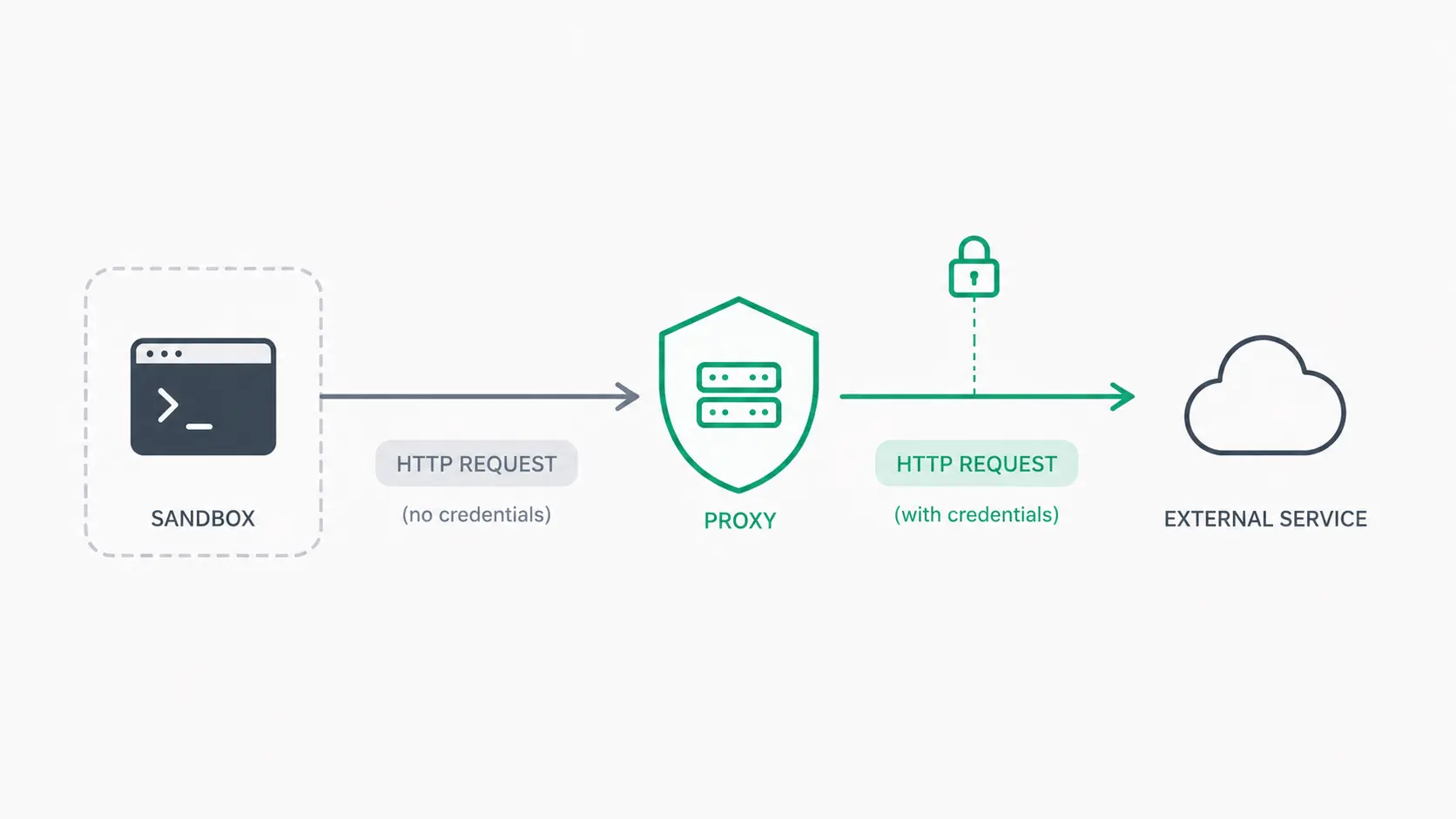
Credential-less sandboxes
tl;dr — this post is a deep dive into giving agents access to external systems without handing them the keys. Specifically, without giving them upstream service credentials directly through secret files, environment variables, or similar mechanisms. Note that this post focuses on HTTP, not other protocols.
Agents running in sandboxes have become one of the core themes of 2026. By now, we know that an agent is only as powerful as the context given to it.
A lot of this context lives in external systems: source code in GitHub, logs and traces in Datadog, issues in Linear, and so on. Giving an agent access to these systems has become a huge unlock for many teams.
In most cases, accessing these systems is just an authenticated HTTP call away. Typically, you’d put the relevant credentials next to the client making those calls. In the context of agents running in sandboxes, this means ensuring that agents have the credentials they need to make HTTP calls through MCP servers, CLIs, raw curl requests, or whatever else the task requires.
Credentials are typically included in the Authorization header of the request. There are good reasons why providing auth directly is fine. There are also good reasons why it can be a terrible idea. Context, use case, and security posture all matter here.
Since this post is about credential-less sandboxes, I want to jump straight into the approach Mistle has taken.
Let’s say you want to run Codex in a sandbox that does not contain your OpenAI API keys or ChatGPT subscription access tokens. How would that work?
Let’s start with how Codex works. Whenever you send a prompt through Codex, it fires off a request to https://api.openai.com/ or https://chatgpt.com/. By the time that request reaches OpenAI, it looks something like this:
POST /v1/responses
Host api.openai.com
Content-Type: application/json
Authorization: Bearer <YOUR API KEY HERE>

...
To represent this as a simple diagram:

If you’re making this request from a sandbox that does not have credentials, the request would look more like this:
POST /v1/responses
Host api.openai.com
Content-Type: application/json

...
Notice how we’re missing the Authorization header? If we let this request proceed directly to OpenAI, we’d get an HTTP 401 UNAUTHORIZED.

Since we do not want upstream credentials in the sandbox, we need to inject them into the request outside of the sandbox. To do so, we’ll introduce an additional service, which we’ll call the credential proxy.

At this point, there are a few questions we care about:
- How does the request get sent to the credential proxy instead of
api.openai.com? - How does the credential proxy know where the request needs to go?
- How does the credential proxy know what credential it needs to inject?
- Where does the credential live?
Let’s start with the first question: how do we get Codex to send its requests to our credential proxy instead of api.openai.com?
There are a few ways to achieve this:
1. Application configuration
If the application allows for it (Codex does), you can configure the application to send requests to a known destination (like our credential proxy) ahead of time. In the case of Codex, we can set up a custom model provider in config.toml that points to our credential proxy:
# config.toml
model_provider = "mistle_proxy"

[model_providers.mistle_proxy]
name = "Mistle Proxy"
base_url = "https://proxy.mistle.example"
This tells Codex to use mistle_proxy when making requests. All of its model requests will now be directed to the credential proxy.
Now, what if we also wanted to do the same for OpenCode Go, Anthropic, or a million other providers? This works for a small number of applications, but it fails to scale when you have more targets or when you do not know what you need to proxy ahead of time.
2. Environment variables
Another approach is to use conventional environment variables such as HTTPS_PROXY, WSS_PROXY, etc. You could set a variable such as:
$ export HTTPS_PROXY=https://proxy.mistle.exampleMost modern HTTP clients respect these common environment variables. In turn, the applications that build on top of them often respect them as well. The presence of these environment variables changes the behavior of HTTP clients so they send requests through the configured proxies.
The caveat is exactly this: it only works if the HTTP clients actually respect those environment variables.
Not every application respects these conventional environment variables. We now face the same problem as the first approach.
3. Transparent proxying
The last approach, and the one we went with, is transparent proxying. As the name implies, it operates without requiring user-side configuration. This is usually done at the router or firewall level. In our case, we used nftables, the successor to iptables and an interface over Netfilter, a Linux kernel subsystem that provides hooks for intercepting, inspecting, and modifying network packets. Put simply: nftables is a framework for configuring the rules that Netfilter uses to process network packets.
Since we’re operating at the packet-filtering layer, we can set up rules that match outbound traffic from the sandbox and redirect selected connections to a proxy target (we’ll get to this in a bit). This means that we can set the rules once and have them apply to everything in the sandbox that tries to send network requests out.
Of course, it’s not that straightforward: you have to account for potential infinite loops, the sandbox’s connectivity to its own control plane, and other operational details like interfering with Docker’s networking if you expect to use it. I won’t go into those details in this article.
Here’s what that looks like now:

Wait - why do we have an egress proxy now? This brings us to the next questions:
- How does the credential proxy know where the request needs to go?
- How does the credential proxy know what credential it needs to inject?
When the sandbox starts, we also start an egress proxy. The nftables rules redirect matching outbound traffic from the sandbox to this egress proxy.
The egress proxy is given a small amount of bootstrap data, including a signed, time-bound token it can use to authenticate to the credential proxy. The egress proxy stores this token in memory and uses it when it needs to forward a request for credential injection.
Importantly, this token is not the upstream service credential. It cannot call OpenAI, GitHub, Datadog, or any other external system directly. It only lets the egress proxy ask the credential proxy to handle a request on behalf of a specific sandbox.
The token is an HS256 JWT containing the following claims:
- the ID of the sandbox
- the ID of the organization that owns this sandbox
- some other claims, though the first two are what matter right now
A quick note here: the rules redirect matching outbound traffic to the egress proxy, but the egress proxy only handles HTTP requests. Everything else is either passed through or ignored depending on the policy we configure for that sandbox.
For simplicity, the examples below show the HTTP message shape. Let’s come back to the request Codex was sending to api.openai.com without an upstream credential:
POST /v1/responses
Host api.openai.com
Content-Type: application/json

...
After the nftables rules are in place, this connection is redirected to the egress proxy running inside the sandbox. The egress proxy receives the request and rewrites it into a request to the credential proxy:
POST /_mistle/egress/http?target=https%3A%2F%2Fapi.openai.com%2Fv1%2Fresponses
Host: proxy.mistle.example
X-Mistle-Egress-Token: Bearer XYZ
Content-Type: application/json

...original request body...
So the flow becomes:

(please pardon my diagramming skills)
A few things are happening here:
- The request is no longer heading directly to
api.openai.com. Instead, it is heading to the credential proxy through the egress proxy. - The original URI is preserved as a query parameter.
X-Mistle-Egress-Tokenis the signed token used to authenticate the egress proxy to the credential proxy.
The credential proxy receives this request, resolves the right credentials based on the token and original request details, and reconstructs the intended request to api.openai.com:
POST /v1/responses
Host: api.openai.com
Content-Type: application/json
Authorization: Bearer <actual credentials>

...original request body...
The sandbox ID and organization ID in the token are used to retrieve a runtime plan compiled for the sandbox and stored in the database. This runtime plan contains a set of hosts, and potentially paths, that should be proxied. The credential proxy uses this information to determine whether the request is allowed, whether it should be proxied, and where it should fetch the credentials from.
Finally, that leads us to the last question: where does the credential live? This part is simple: it lives encrypted in a data store, and the credential proxy fetches it at runtime for injection.
If you’ve made it this far, kudos to you.
Final notes
The examples in this post cover the HTTP case, not the full HTTPS flow. The same architecture can be extended to HTTPS, but doing so requires a proxy to participate in the TLS flow so it can inspect and rewrite requests. There are many implementations today, such as mitmproxy, that already do this.
Credential-less sandboxes are useful for reducing upstream secret exposure, but they significantly increase architectural complexity. Working with agents securely involves many moving parts, and this is just one technique to reach for when the use case calls for it.